🥈 2nd of 42 · Catalyst 2026
Breather
Run a caregiver-benefit pilot without the admin, then decide what happens next with evidence instead of guesswork.
Built in 48 hours for SE Health’s Respite for All challenge at Catalyst 2026, a case-study hackathon hosted by Speer Technologies at Northeastern University Toronto (October 16–18, 2026).
Have an access code? Open the live demo
The problem
Employers like the idea. Then the pilot stalls.
“How can technology help employers confidently adopt, evaluate, and scale caregiver-support benefits without creating unnecessary administrative burden, privacy concerns, or uncertainty around long-term costs?”
— SE Health, Respite for All challenge brief
SE Health’s brief is clear that funding isn’t the bottleneck: recruiting employers is. Employers hesitate for three reasons.
Cost after the funding ends
The pilot is grant-funded. Nobody wants to start a benefit they may have to take away, with no way to know what continuing would cost.
Admin load
HR teams are small and already stretched. A pilot that adds paperwork is a pilot that never starts.
Employee privacy
Caregivers won’t sign up if they think their employer will know it’s them, yet the employer still needs proof the pilot is working.
~35%
of the Canadian workforce are working caregivers (6.1M employees)
Source: CCCE via Benefits Canada, May 2025
62%
of HR leaders don’t know how many caregivers they employ
Source: CCCE
79% vs 7%
of caregivers rate respite as important, versus those who have actually used it
Source: CCCE, Caring in Canada 2026
8–10
employers in the Respite for All pilot, up to 3 months each, grant-funded
Source: SE Health challenge brief
How it works
Three layers. Data flows one way.
Breather runs an employer’s 3-month pilot from sign-up to decision. Personal data stays with SE Health, the care provider. The employer pays for the benefit but only ever sees company-wide totals, much like insurance: you fund the plan, you never see who claims.
- Caregivers
An anonymous, one-minute survey
No name, email or employee ID. Reaching the employer’s private link is the proof of employment. A plain-rules eligibility engine answers on the spot: accepted with a random claim number, waitlisted in priority order, or not eligible right now.
- HR
Company-wide totals, nothing more
Potential caregivers, accepted, waitlisted, usage, trends against the baseline, and focus-group themes. No department breakdown, and a minimum group size hides small counts.
- CFO
Scale, sustain or stop
A recommendation from the employer’s own pilot data, with its reasons, a low / base / high cost to continue, and a projection drawn as a widening band: a projection, not a prediction. The assumptions are editable.
Caregivers → SE Health → the employer, as totals. Nothing flows back the other way.
Under the hood
Plain rules where they belong, AI where it helps.
All decision logic runs on the server. The browser only ever receives results.
Eligibility engine
Plain, auditable rules decide each sign-up on the spot. A priority score orders the waitlist.
Privacy-first aggregation
Answers are turned into company-wide totals. Small groups are hidden before anything reaches the employer’s side of the database.
Jev decision model
Jev, TypeSafe AI’s decision model, scores the evidence and assigns scale, sustain or stop, always with its inputs and reasons. It also checks focus-group quotes for personal information. A rules engine cross-checks it and takes over if Jev is unavailable.
Cost and projection
A low / base / high cost to continue, built from the pilot’s own usage, and a 12-month projection band that widens with the horizon.
Architecture
Browser
- Caregiver survey
- HR dashboard
- CFO decision
Next.js server (route handlers)
- Eligibility + priority
- Aggregation + small-count suppression
- Cost model + projection
- Jev client + rules fallback
Intake schema
Individual answers. Writer role only.
Employer schema
Totals only. Read-only dashboard role.
Jev by TypeSafe AI
via @typesafe-ai/sdk
Stack
- Next.js 16 (App Router)
- React 19
- TypeScript
- Postgres on Supabase
- Jev via @typesafe-ai/sdk
- Zod contracts
- Recharts
- Vercel
- Vitest, Playwright, axe
~$0.0032AI cost per full runSource: Our measured Jev usage
Privacy & responsible AI
Privacy the code enforces, not just the pitch.
Anonymous by design
The survey never asks for a name, email or employee ID.
Aggregates only
The employer sees company-wide totals. There are no department, team or location breakdowns.
Minimum group size
Any number from too few people is hidden before it is stored where the employer can read it.
Personal-info filter
Focus-group quotes are checked for names, contact details and other identifiers. If the check can’t run, the quotes are dropped.
AI recommends, a person decides
Every recommendation shows its inputs and reasons, and the rules engine’s view alongside. The CFO makes the call.
Synthetic data only
Every number in the demo is synthetic. Northwind Logistics is a fictional employer.
See it
The pilot, start to finish
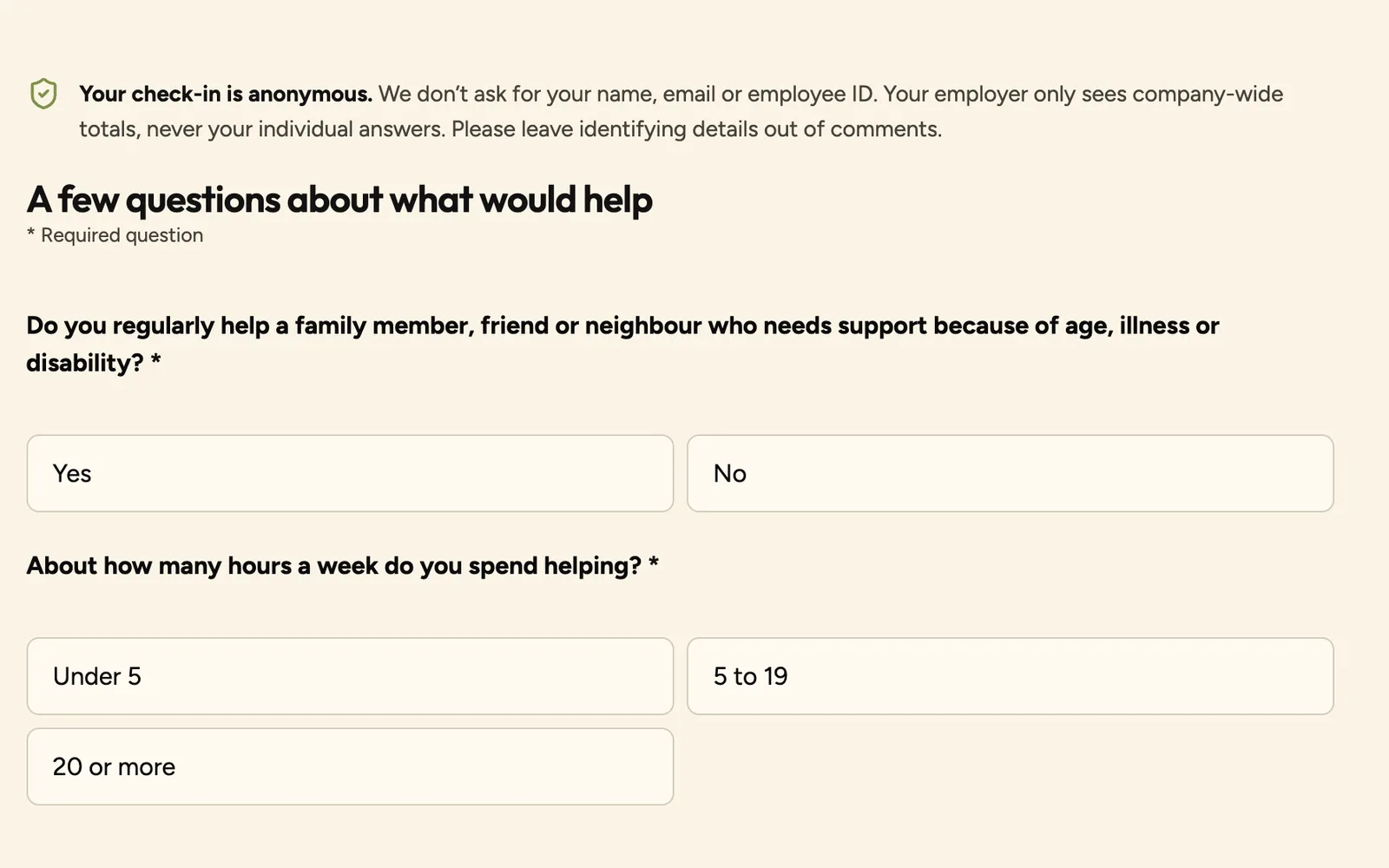
Caregiver survey: anonymous, about a minute, instant result. 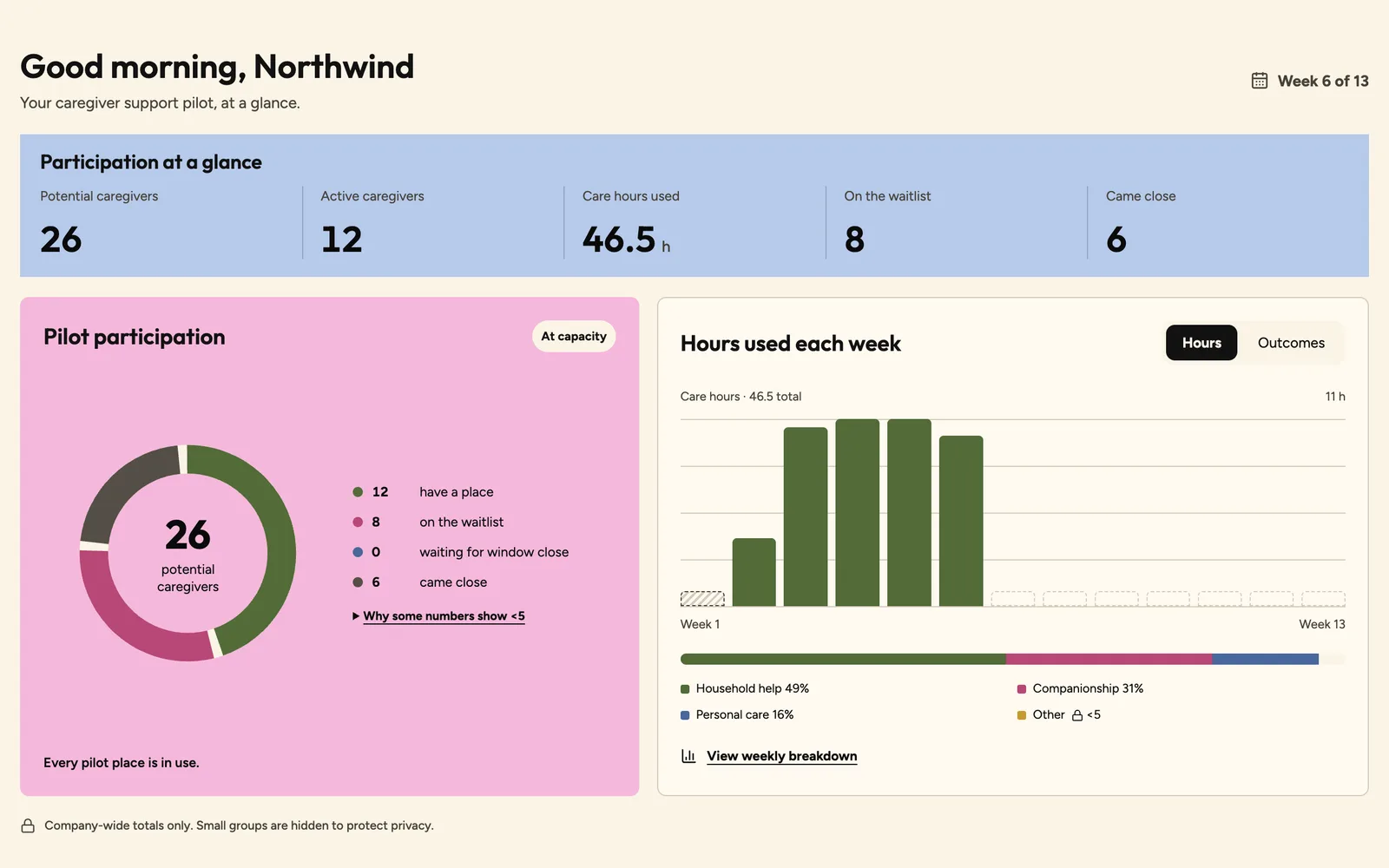
HR dashboard: company-wide totals, small counts hidden. 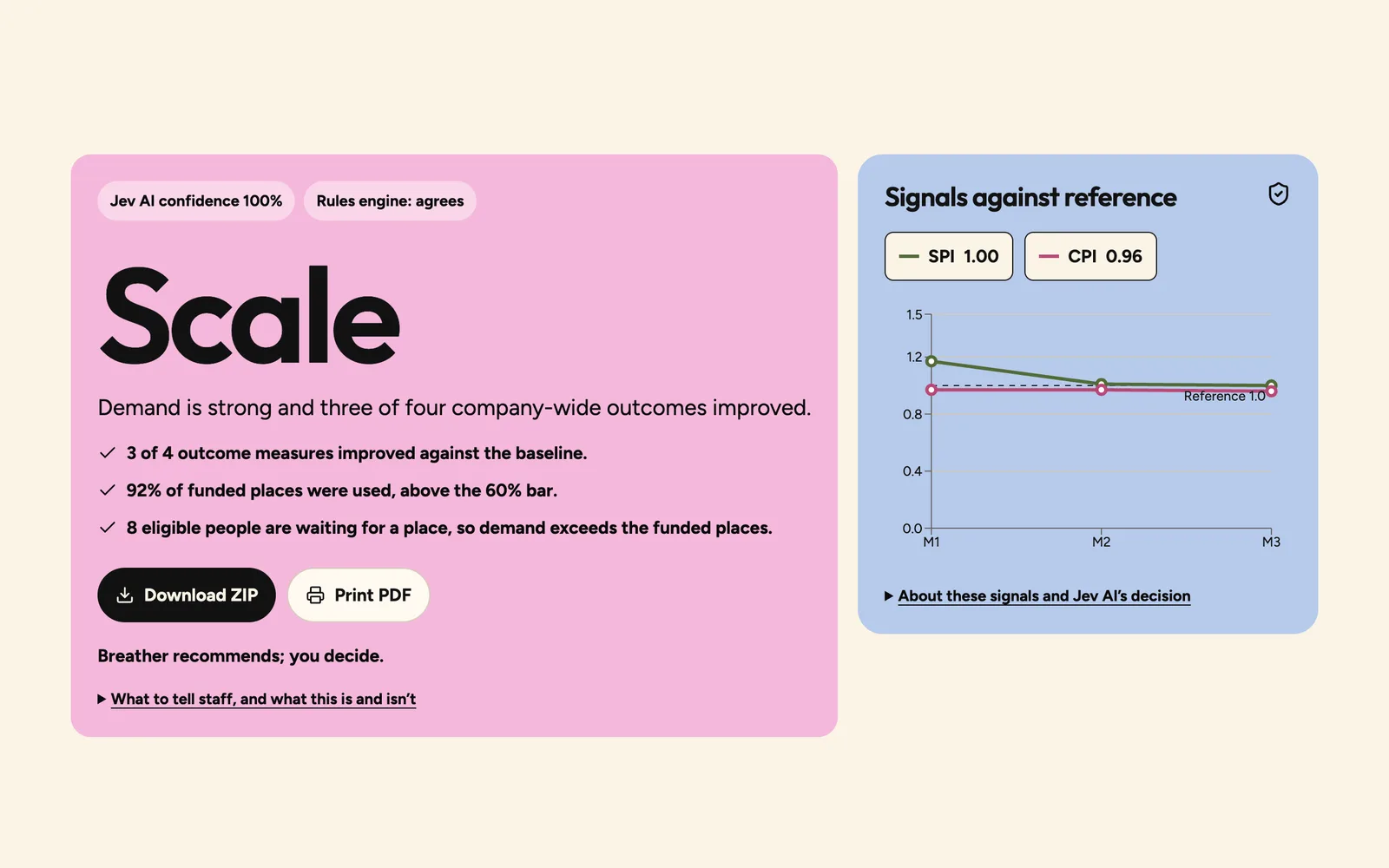
CFO decision: a recommendation with its reasons. 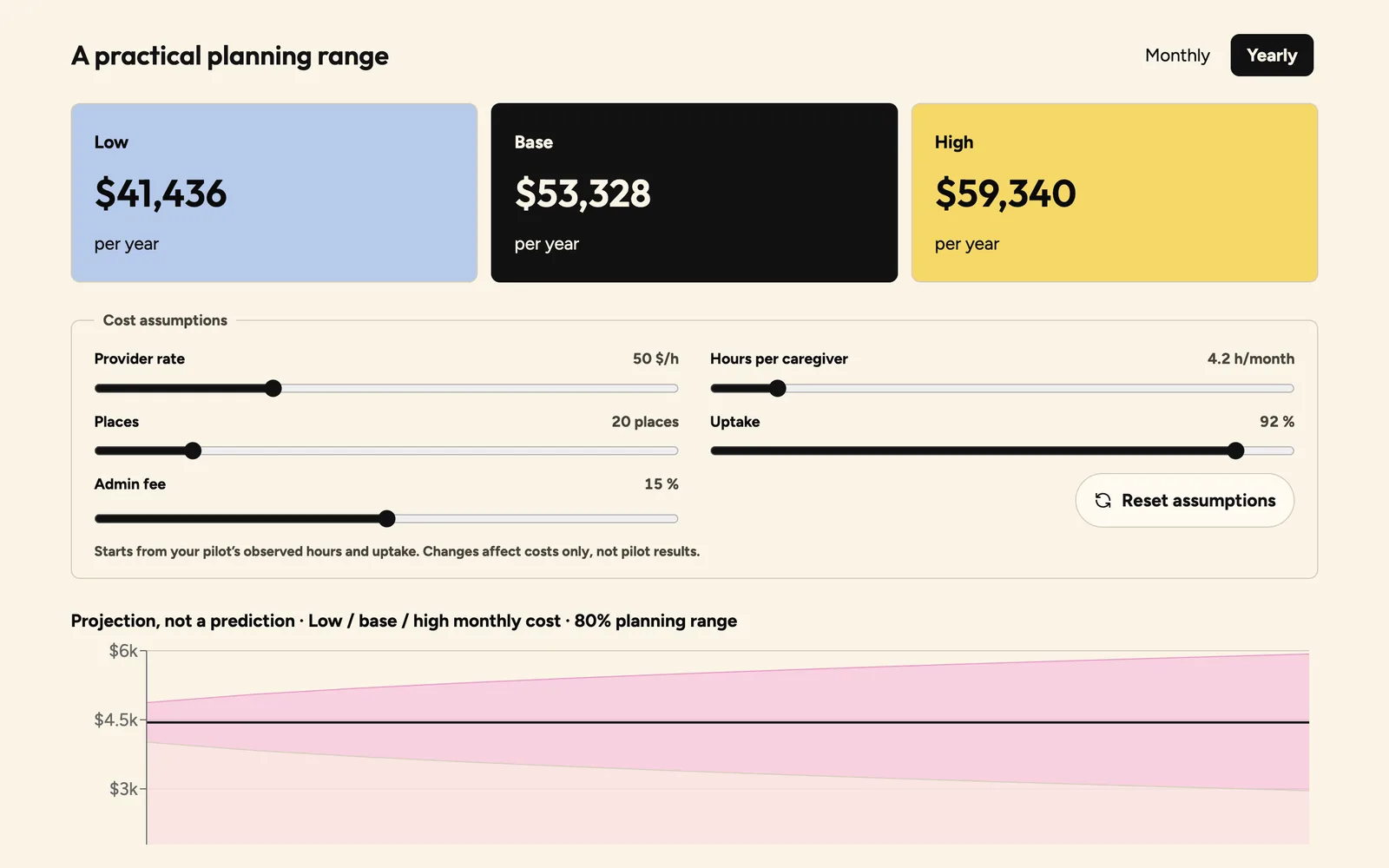
Cost to continue: a range and a widening projection band.
Team
Built by four people in 48 hours
Glenn Salvador
Backend and architecture
Data pipeline, eligibility engine, scoring, API
LinkedIn profile of Glenn Salvador (opens in a new tab)GitHub profile of Glenn Salvador (opens in a new tab)
Victoria Chernobay
Frontend and UI
Interface design and build
LinkedIn profile of Victoria Chernobay (opens in a new tab)GitHub profile of Victoria Chernobay (opens in a new tab)
Chay Suthahar
Project manager
Project management, code review and PR approvals
LinkedIn profile of Chay Suthahar (opens in a new tab)GitHub profile of Chay Suthahar (opens in a new tab)
Giada Laceda
Research and pitch
Research, pitch and presentation